Amini Decks
Build brand-compliant Amini decks — native editable .pptx, or a 16:9 HTML deck, from one deck spec.
Install
$ zana add amini-decksThe .pptx builder needs python-pptx (plus pyyaml for YAML specs): `uv run --with python-pptx scripts/build_pptx.py deck.json`, or `pip install python-pptx`. Rendering decks for verification uses LibreOffice (`soffice`) + poppler (`pdftoppm`). The HTML path needs nothing installed.
How it runs
A native, editable .pptx that cannot drift off-brand.
- 01
Spine
Pick the narrative arc for the audience in the room
- 02
Deck spec
Author content as JSON. Layout is never hand-placed
- 03
Lint
Headline length, bullet ceiling, one accent per slide
- 04
Build
python-pptx renders the spec to a real .pptx
- 05
Render
LibreOffice to PDF to PNG, then read every slide
- 06
Deliver
Ship the spec beside the deck so revisions are edits
Marked steps are enforced by a script.
Sample work
What this skill actually produced. Not mockups.
Example: an eleven-slide partner-lab briefing
examples/6g-isac-briefingA falsifiable-claims deck built from a research paper. Spine, layouts, and every visual decision come from the skill; only the content is authored.
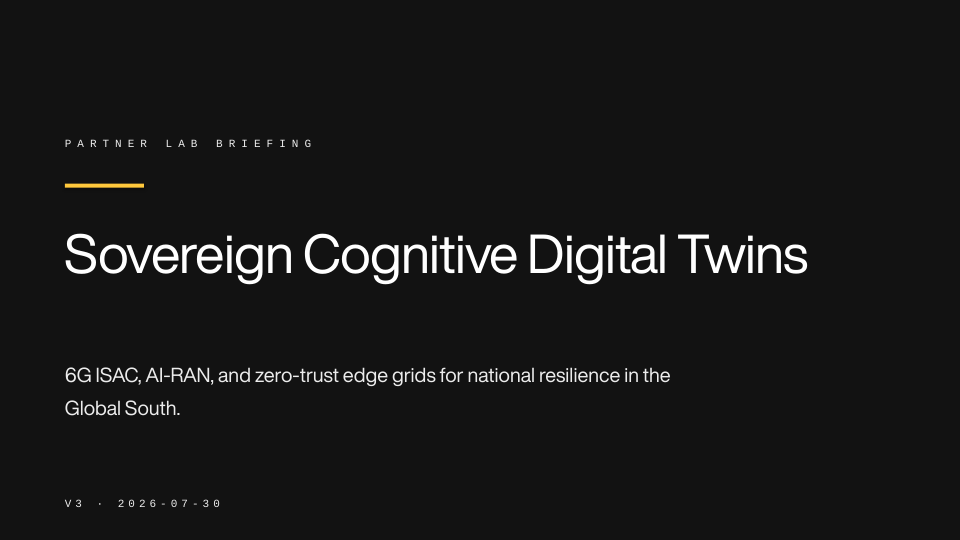
preview/slide-01.png · 1/11
{
  "title": "Sovereign Cognitive Digital Twins",
  "subtitle": "Reusing the 6G radio interface as a national sensing layer, on infrastructure a country already owns.",
  "mode": "dark",
  "footer": "Amini · Sovereign Cognitive Digital Twins",
  "meta": {
    "audience": "Partner lab briefing",
    "version": "v3",
    "date": "2026-07-30"
  },
  "slides": [
    {
      "layout": "title",
      "title": "Sovereign Cognitive Digital Twins",
      "subtitle": "6G ISAC, AI-RAN, and zero-trust edge grids for national resilience in the Global South.",
      "notes": "Cayetano, Gichuru, Morris. Say up front which parts are built and which are specified. The honesty boundary is slide 9 and it is the reason this briefing gets a second meeting."
    },
{36 files. Read them here, or pull the folder without the CLI.
$ npx degit aminitech/amini-zana/catalog/skills/amini-decks ~/.claude/skills/amini-decksNo clone, no history. Just this folder.
$ git clone --depth 1 --filter=blob:none --sparse https://github.com/aminitech/amini-zana.git && cd amini-zana && git sparse-checkout set catalog/skills/amini-decks$ curl -sL https://raw.githubusercontent.com/aminitech/amini-zana/main/catalog/skills/amini-decks/SKILL.md---
name: Amini Decks
description: >-
Build brand-compliant Amini presentations — native editable .pptx via python-pptx, or a
16:9 HTML deck for screen. Use for any request like "make a deck", "pitch deck", "board
deck", "ministry briefing", "investor update", "partner intro", "QBR", "slides for X",
or "put this in PowerPoint". Enforces the Amini design system: Space Black ground,
Marble White type, one Sunglow accent per slide, Geist Mono eyebrows, WCAG AA. Narrative
spine first, slides second. Ships a deck-spec builder with a brand linter.
license: MIT
metadata:
author: Amini
version: "1.0.0"
upstream: "Layout and copywriting patterns adapted from the claudekit `slides` skill (MIT)."
---
# Amini Decks
Produce decks that read as **premium, technical, and forward-looking** — the same three
words the Amini design system is built on. A deck is an argument delivered in sequence,
not a document with bullet points.
Two output paths, one design system:
| Output | When | How |
| --- | --- | --- |
| **`.pptx`** — native, editable | The deck leaves the building: ministries, investors, partners, telcos. Anyone who will edit, re-order, or present it in PowerPoint / Keynote / Google Slides. | `scripts/build_pptx.py` from a deck spec |
| **HTML** — 16:9, keyboard-driven | Screen-presented, internal, or design-forward decks that need charts, motion, or web embeds. Prints to PDF at full fidelity. | `references/html-template.md` |
**Default to `.pptx`** unless the deck is presented from a browser and never edited by
someone else. "Branded PowerPoint" means `.pptx`.
## Read these as needed
Load only what the task requires:
- `references/deck-spines.md` — narrative spines per audience, and Amini's messaging spine.
- `references/layouts.md` — the eleven layouts, what each is for, and the spec fields each takes.
- `references/copywriting.md` — headline and body formulas; the verbal rules.
- `references/html-template.md` — the branded HTML deck (tokens, nav, Chart.js theming).
- `references/brand-qa.md` — the pre-delivery checklist and how to verify rendering.
- `assets/tokens.css` — the design tokens, drop-in.
- `examples/6g-isac-briefing/` — a complete eleven-slide partner-lab briefing built from a
research paper: spec, built `.pptx`, and rendered slide previews.
## Workflow
### 1. Establish the spine before writing a single slide
Ask — or infer from the brief — three things: **who is in the room**, **what they must do
next**, and **what one sentence they should leave with**. Then pick a spine from
`references/deck-spines.md` (government, investor, telco/commercial, internal review).
If the request is strategic ("what should this deck say", "structure my slides"), stop at
the spine + a one-line-per-slide outline. Do not build. Show the outline and get agreement
— rebuilding a deck is cheap, re-earning a minister's attention is not.
### 2. Write the spec, not the slides
Content goes in a deck spec (JSON or YAML); every visual decision belongs to the builder.
This is what makes a deck impossible to drift off-brand.
```json
{
"title": "Sovereign AI Infrastructure",
"subtitle": "The data, connectivity, and compute layer for the next four billion people.",
"mode": "dark",
"footer": "Amini · Sovereign AI Infrastructure",
"meta": { "audience": "Ministry briefing", "version": "v1.0", "date": "2026-07-31" },
"slides": [
{ "layout": "title", "title": "Sovereign AI Infrastructure", "notes": "Open on agency, not technology." },
{ "layout": "statement", "title": "The problem was never insights — it was infrastructure.", "accent": "infrastructure" },
{ "layout": "metrics", "title": "The gap is structural, not a skills problem.",
"metrics": [{ "value": "<1%", "label": "of global compute sits in Africa", "accent": true }] }
]
}
```
`scripts/deck.example.json` is a complete, working eight-slide deck — start from it.
Full field reference per layout: `references/layouts.md`.
**Rules the spec must respect:**
- The **headline is the point** — a full sentence, not a label. "Telcos lose X to Y" beats "Market".
- **One idea per slide.** If it needs a paragraph, it is two slides or a spoken line.
- **Six bullets is the ceiling**; four is better. Long bullets are speaker notes — put them in `notes`.
- **Exactly one Sunglow accent per slide.** Mark the single metric that carries the argument.
- Everything the presenter says but doesn't show goes in `notes` — it survives into PowerPoint.
### 3. Build
```bash
# lint the spec against the brand rules — writes nothing
uv run --with python-pptx scripts/build_pptx.py deck.json --lint-only
# build
uv run --with python-pptx scripts/build_pptx.py deck.json -o deck.pptx
uv run --with python-pptx scripts/build_pptx.py deck.json --mode light # light ground
uv run --with python-pptx scripts/build_pptx.py deck.json --strict # lint findings are fatal
```
Paths are relative to this skill's directory. YAML specs also need `--with pyyaml`.
Without `uv`: `pip install python-pptx` and run with `python3`.
**Fonts.** The builder defaults to Helvetica Now Display + Geist Mono. `.pptx` cannot embed
fonts — a viewer without them gets a silent substitution. For decks that leave the
building, either confirm the recipient has them or pass
`--font-display Arial --font-mono "Courier New"` and accept the trade.
### 4. Verify what you actually produced — always
Never deliver a deck you have not seen rendered. Text overflows, headlines wrap into
content, tables run past the safe area.
```bash
soffice --headless --convert-to pdf deck.pptx --outdir .
pdftoppm -png -r 80 deck.pdf slide
```
Then read every PNG and run `references/brand-qa.md`. Fix by editing the **spec**, never
by hand-editing the .pptx — hand edits are lost on the next build.
### 5. Illustrations
Decks needing editorial imagery pair with the **`amini-illustrations`** skill: plan a shot
list, generate 16:9 images, audit the palette, then reference the files from `image`
slides. Do not let an illustration become decoration — if the slide's idea survives with
the image removed, cut the image.
### 6. Deliver
Save as `decks/<slug>/<slug>.pptx` alongside its spec, so the next revision is a spec
edit. Report: slide count, spine used, mode, what is unverified, and which slides are
load-bearing versus cuttable if time runs short.
## Brand ground rules
Non-negotiable, from `brandkit/DESIGN.md`:
- **Dark is the default.** Space Black `#121212` ground; Marble White `#FFFFFF` type.
- **Sunglow `#FFC83C` is an accent, never a fill.** One accented element per slide.
- **Light mode swaps the accent to Bordeaux `#861D2C`.** Sunglow on white measures ~1.7:1
and fails WCAG AA even at display sizes; the brand mandates AA, so Bordeaux — the
designated light-ground accent — carries the role. Slate Grey stays a divider colour,
never body text on white.
- **Nothing off-palette.** Greyscale plus Sunglow (plus Bordeaux on light). No gradients,
no glows, no drop shadows, no 3D.
- **Eyebrows in Geist Mono, ALL-CAPS**, 4–6% tracking. Hierarchy is always
`eyebrow › heading › body › caption`.
- **Generous space.** Empty area is the brand, not wasted room. Never fill a slide because
it looks empty.
## Output register
Keep the outline terse. Keep delivery factual: what was built, where it is, what was
verified, what wasn't. Don't narrate the design system — the deck carries it.
About
An agentic skill for the deck half of Amini's product surface. It picks a narrative spine for the audience in the room (government, investor, telco, internal review, falsifiable-claims research) before a single slide exists, then renders content from a declarative deck spec — so the argument is authored and every visual decision belongs to the design system. Two outputs, one token set: a native, editable `.pptx` built with python-pptx (eleven layouts, native charts, tables, speaker notes, dark and light grounds), or a self-contained 16:9 HTML deck with keyboard navigation and Chart.js theming for screen-presented decks. Brand rules are enforced in code, not left to discipline: Space Black ground, one Sunglow accent per slide and never as a fill, Bordeaux on light grounds only, Geist Mono eyebrows, WCAG AA. `scripts/build_pptx.py --lint-only` checks a spec before it renders — headline discipline, bullet ceilings, accent count, palette misuse — and `--strict` makes findings fatal for CI. Pairs with amini-illustrations for editorial imagery.
Amini · Manila, Philippines